One-to-one online SEND tutoring

Online tutoring. Built around your child.

An hour of individual attention, in the comfort of their own space. From phonics and fractions to GCSE maths, English and science, your tutor builds each session around how your child learns, what feels difficult and what they need next.

  • Matched for your child, anywhere in the UK
  • Learn at home, with no travel
  • Vetted SEND tutors trained in neurodiversity
See how online sessions work
remarkableminds.app
A demo video call with tutor Priya Shah on the main screen, parent Hannah Brooks in the corner and the call buttons below
1:1

with their own tutor

Your tutor's full attention

60

minutes built around them

£80 for the hour

0

journeys to tutoring

Learn in their own space

6

checks on every tutor

Vetted before you meet

What a tutor can do online

One hour. So many ways to learn.

Reading practice, GCSE science or help planning revision: you can change what the hour covers as your child's needs change. Your tutor chooses activities around them, bringing books, games, exam questions and other resources into the call through screen sharing.

  • 01

    Make sense of the maths

    From a game to practise number skills to a GCSE algebra question, your tutor can share the work on screen and talk through a method. They can draw out a fraction, unpack an equation or try a fresh explanation where your child gets stuck.

  • 02

    Find a way into a text

    Your tutor can share a book or extract on screen, from a story for phonics practice to a scene from Macbeth. They can spend time on a tricky sound, explore what a character means or help your child choose a quotation to support an idea.

  • 03

    Get ideas onto the page

    From spelling a word to planning an exam paragraph, your tutor can share examples and help your child put their ideas into sentences. Writing can happen on paper at home, with practice sheets sent beforehand and photos shared afterwards.

  • 04

    Show it another way

    Your tutor can share an online whiteboard and draw an idea step by step, or play a video with sound and pause to explain. A picture, diagram or demonstration gives your child another way to understand.

  • 05

    Make a big task feel smaller

    Homework or GCSE revision can become a few manageable steps. Your tutor can share a plan or visual timer, agree what to do first and leave room for breaks, so your child has a clear place to start.

  • 06

    Spot where things get stuck

    On a computer, your child can share their screen so the tutor can watch how they approach a task. Seeing the working, as well as the answer, helps the tutor find the point that needs a different explanation.

  • 07

    Start with what they love

    Dinosaurs, football, space: your child's interests can become the starting point for a reading passage, a maths problem or a piece of writing. Tell your tutor what gets their attention and let the session grow from there.

  • 08

    Build up to trying again

    If learning has become something your child avoids, the hour can focus on small, achievable tasks and rebuilding confidence. They can type an answer in the call's chat, keep their camera off and take time to have a go.

Real screenshots from Remarkable Minds

From your first message to your first session.

Here's how you'll get to know your tutor, book an hour and join from home. These screenshots show demo tutor Priya Shah and demo parent Hannah Brooks, whose son Oliver is 9. The examples under step 04 also show GCSE work for Maya, 15.

  1. 01

    Help your tutor get to know your child

    Once you're matched, message your tutor about what makes your child light up and where learning gets difficult. That gives them a starting point for an hour built around your child. Their profile, your messages, bookings and worksheets are all on the same page.

    • Read your tutor's profile and ask questions before you meet
    • Share interests, worries and approaches that have helped before
    • Send homework or a school report to show where support could help
    remarkableminds.app
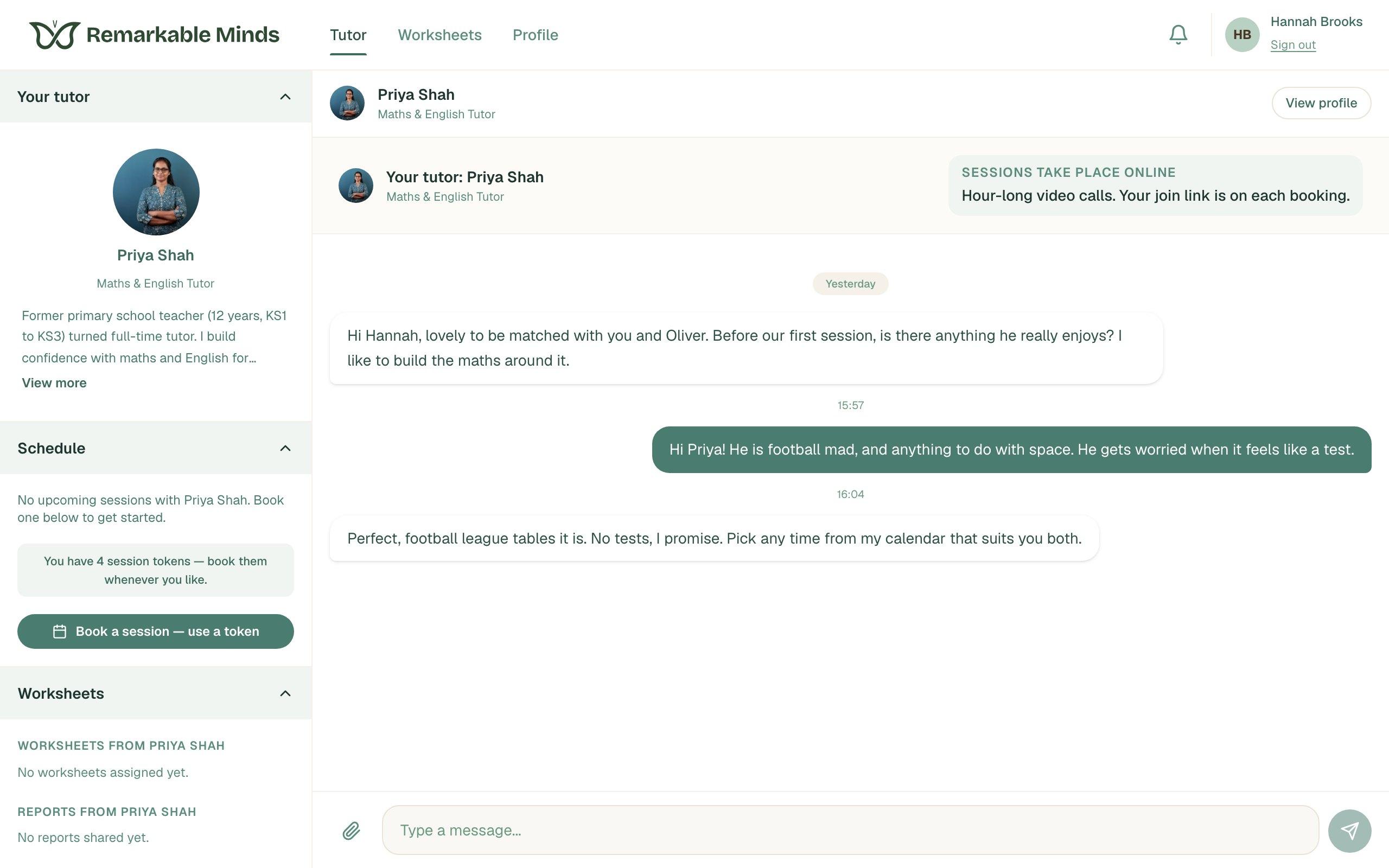
    Hannah's page with Priya's tutor profile, four prepaid session tokens, a booking button and messages about Oliver's interests
  2. 02

    Choose an hour that fits family life

    Open your tutor's calendar and book an available time that suits you. The session appears in your schedule, ready for your child to join from home. There's no journey to plan around it.

    • £80 for a one-hour session
    • Or buy 4 sessions up front for £304 and book whenever you like
    • Reschedule or cancel on your page
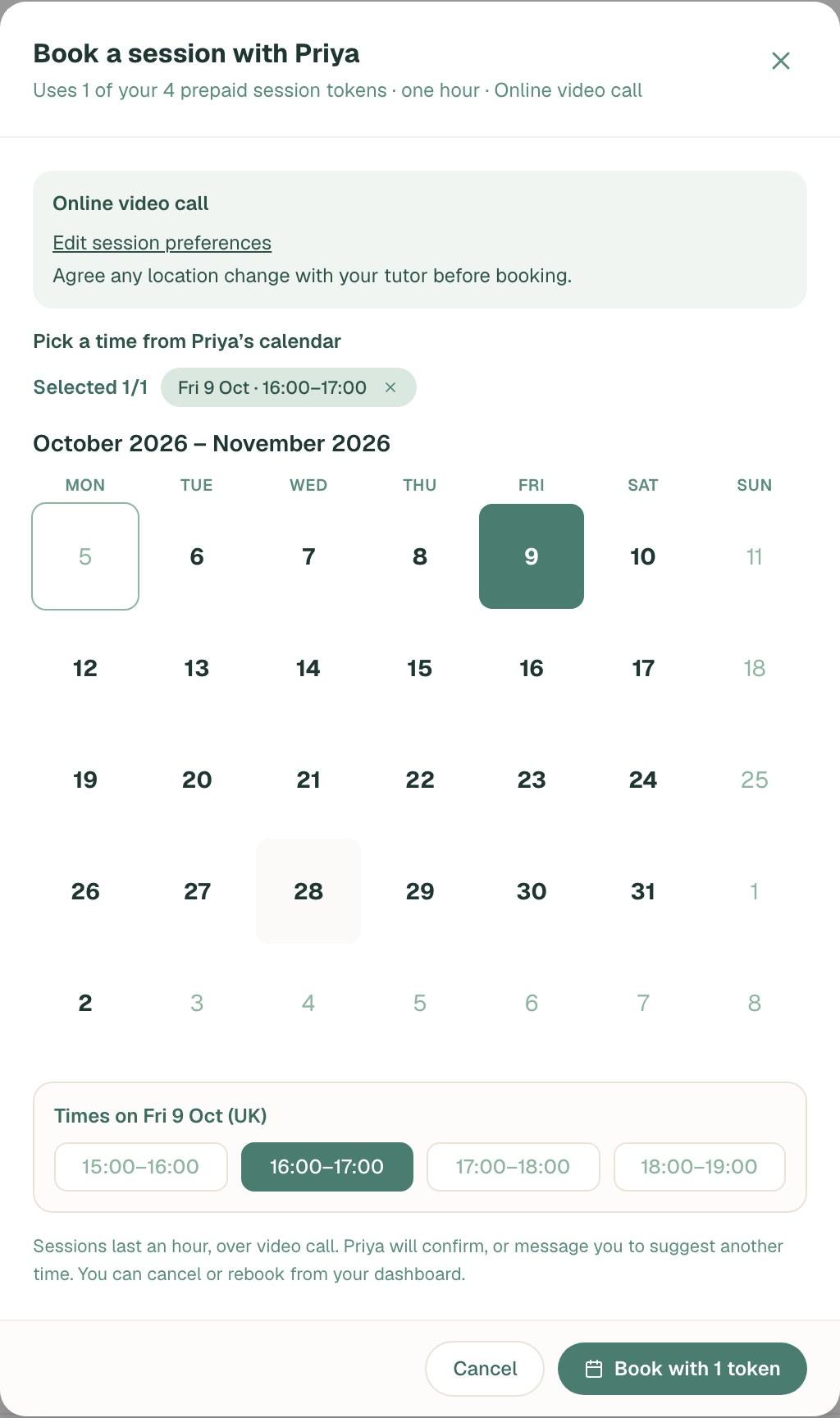
    Priya's booking calendar with Friday 9 October, 16:00–17:00 selected and a Book with 1 token button
  3. 03

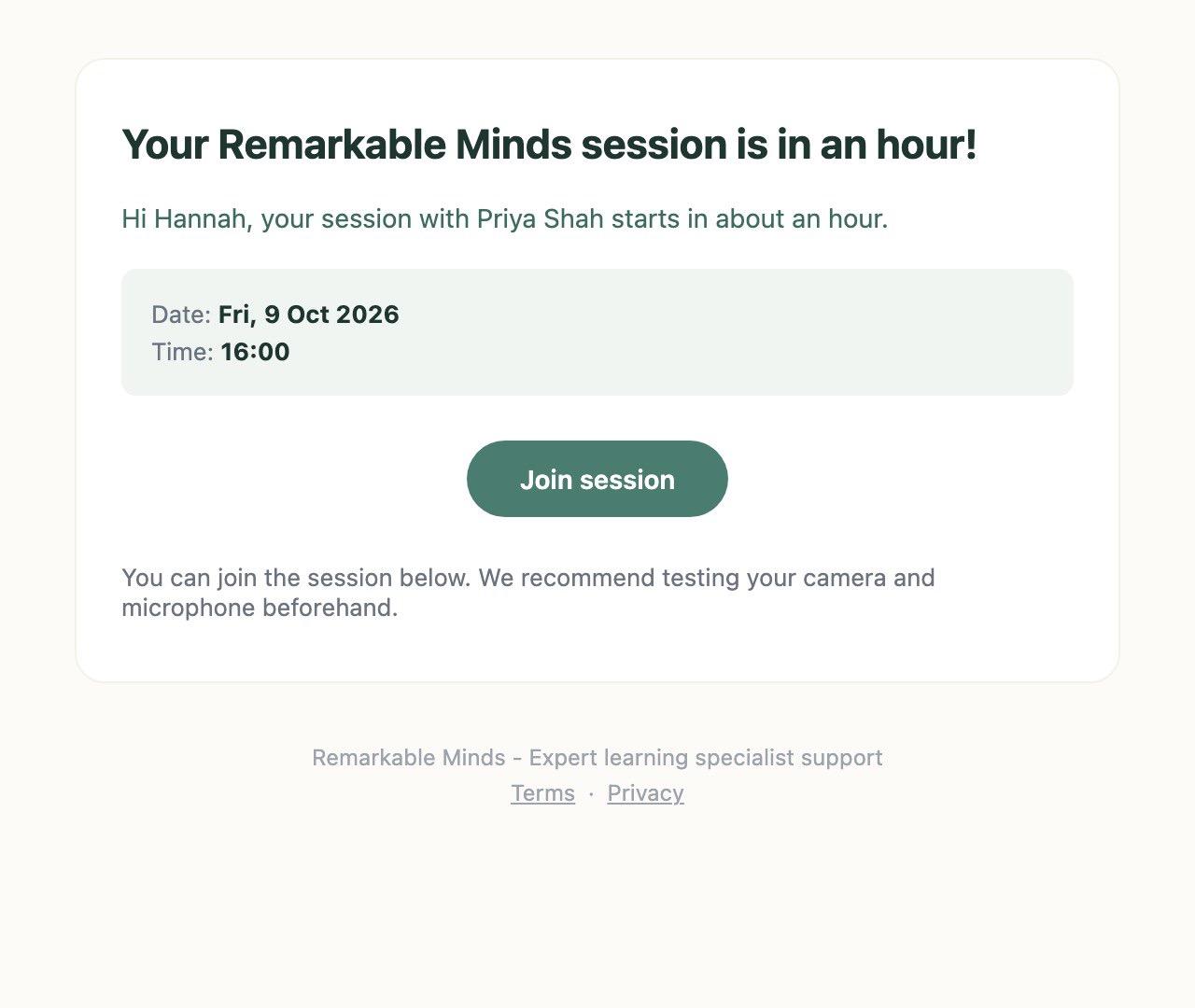
    We'll remind you when it's time

    Your confirmation arrives by email straight away, with Join session and Add to calendar buttons. We'll remind you the day before and again an hour before, with the join link to hand when you need it.

    • Use Add to calendar to save the date and time
    • Reminders also come by WhatsApp or text when we have your mobile number
    • Your join link works from an hour before the start
    An email to Hannah reminding her that her session with Priya starts in an hour, with the date, time and Join session button
  4. 04

    Learn together, at your child's pace

    The hour can start with a chat about what your child wants help with or something they enjoy, followed by an easy first task. Your tutor shares their screen to bring a story, diagram or GCSE exam question into the call. As they work together, the tutor can slow down, try a different explanation or follow an idea that catches your child's interest.

    • Build a story sentence or plan an exam paragraph, starting with your child's ideas
    • Talk through a tricky question, with time to answer aloud, in chat or on paper
    • Pause for a stretch, then finish by noticing something your child can now do or feels happier trying
    remarkableminds.app
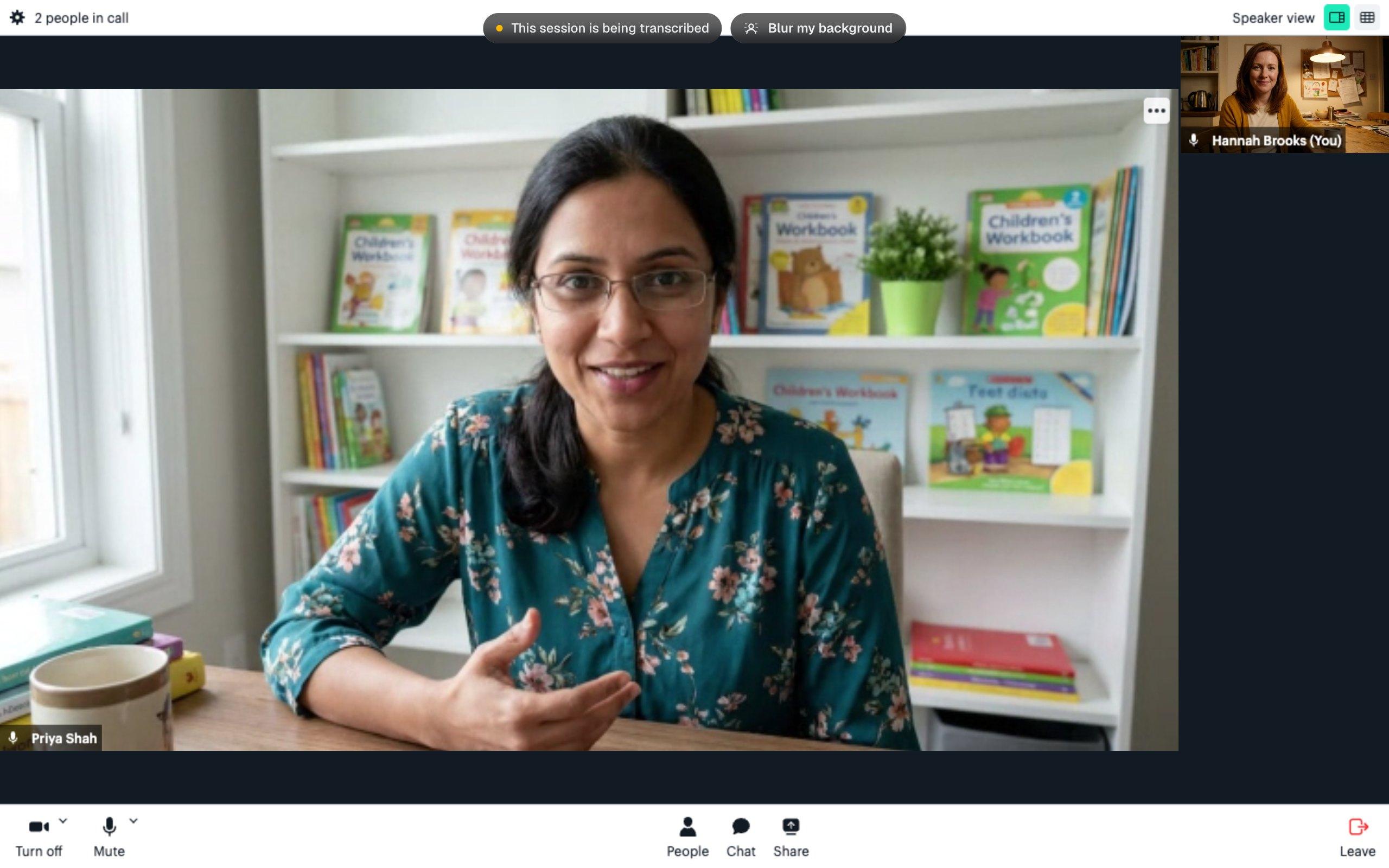
    Priya on the main video, Hannah in the corner, call controls along the bottom and a transcription notice at the top

    For Oliver, who loves football and space but worries about tests, an hour could look like this.

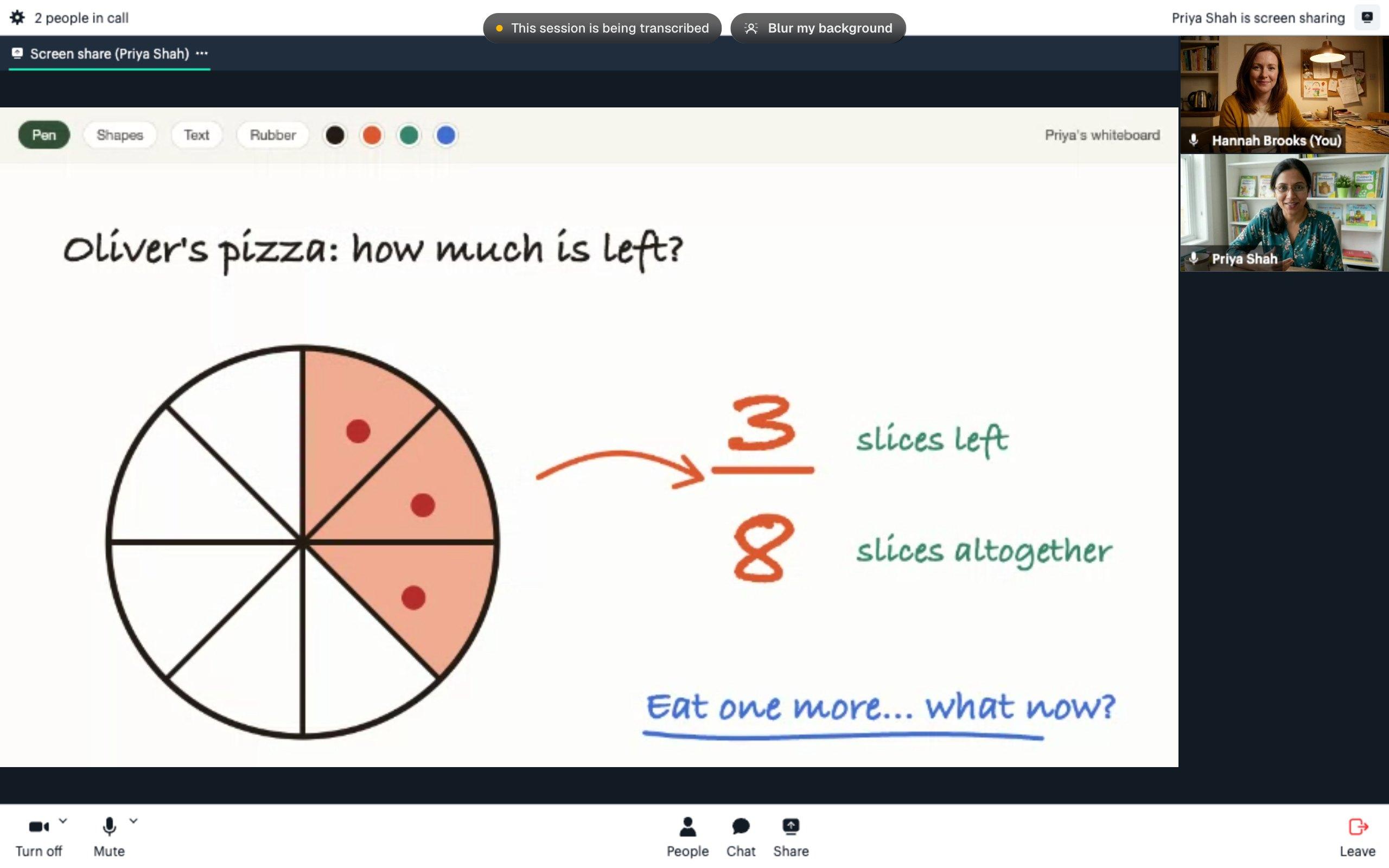
    • The call with the tutor's whiteboard shared: a pizza drawn in eight slices with three shaded, and 3 over 8 written beside it

      See what three eighths means

      Priya can share her whiteboard and draw a pizza, counting eight slices with Oliver and shading three. What changes if we eat one more? She can change the drawing as he talks it through, helping him connect the slices he can see with the fraction written beside them.

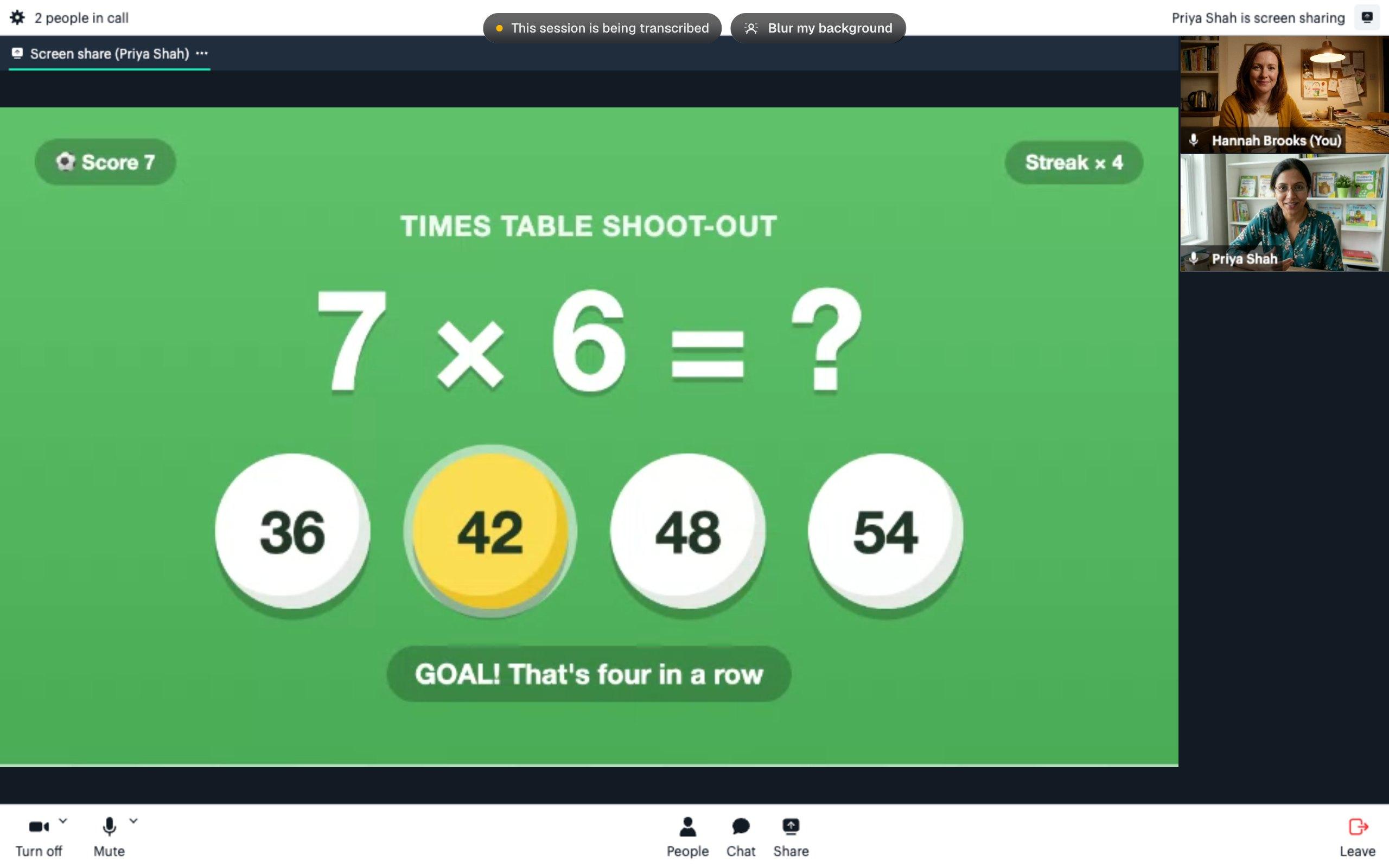
    • The call with a football-themed times table game shared: 7 times 6, four answer balls with 42 highlighted, and Goal, that's four in a row

      Put his times tables on the pitch

      Priya can share a football game and give Oliver time to work out 7 × 6. If he's stuck, they can start with 5 × 6 and add two more sixes. Each goal is a chance to celebrate and talk about how he found his answer.

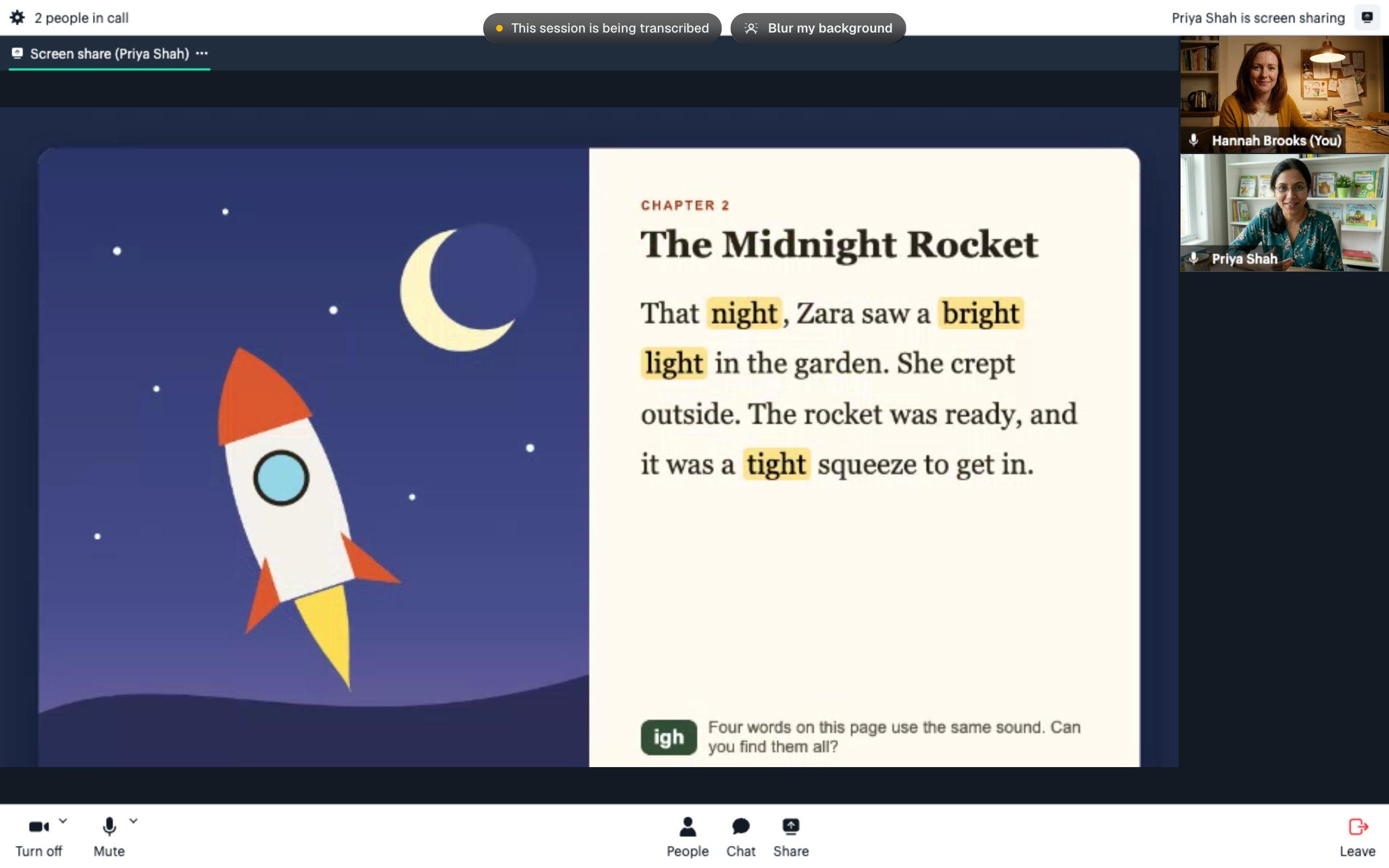
    • The call with a story book shared: a rocket picture beside a page of text with the words night, bright, light and tight highlighted for the igh sound

      Follow a story, find a sound

      Priya can share The Midnight Rocket and read alongside Oliver, highlighting night, bright, light and tight to explore the 'igh' sound. She might read a sentence first, let him try it with her, then pause to wonder where the rocket could go next.

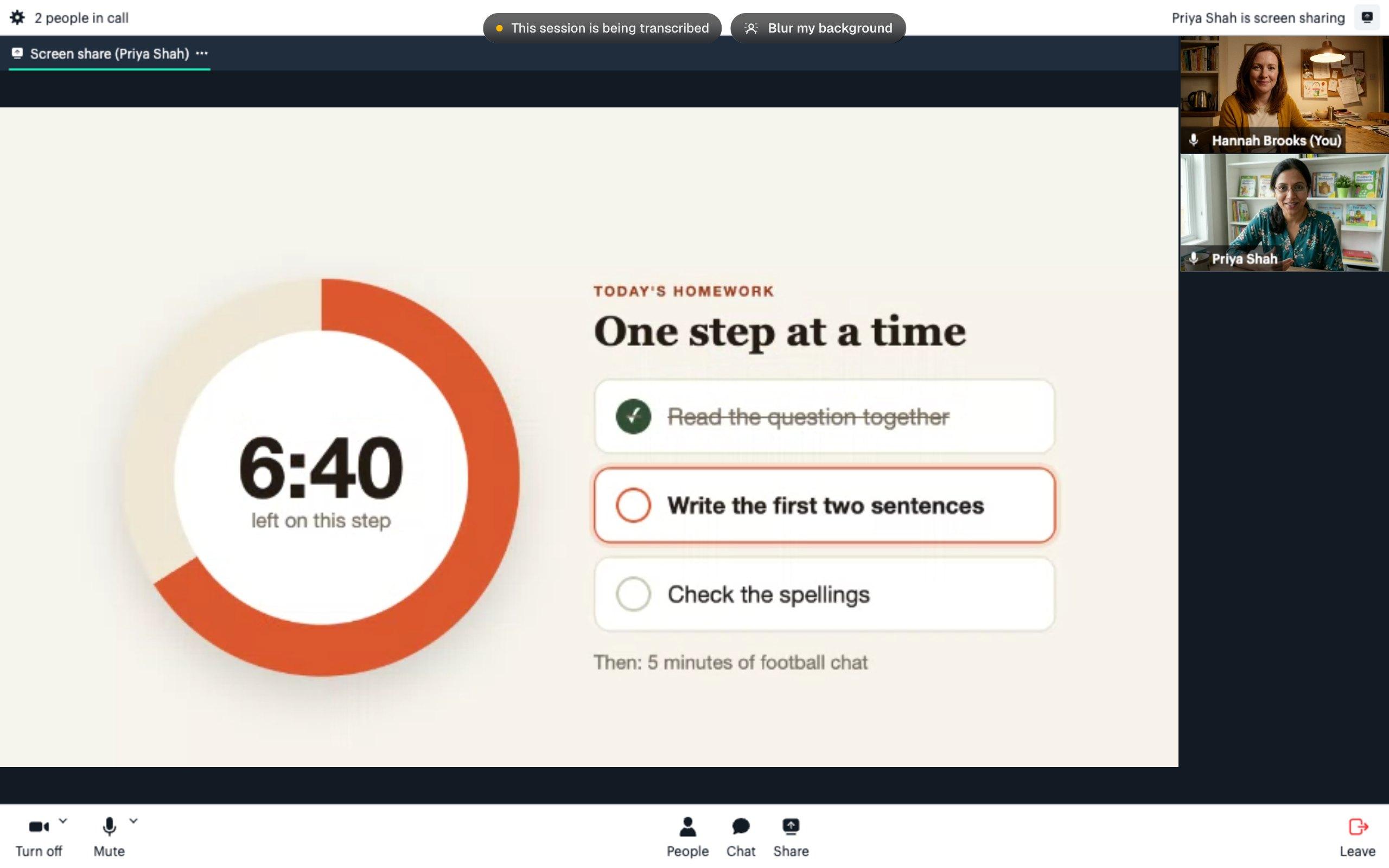
    • The call with a visual timer shared: 6 minutes 40 left, beside a three-step homework plan with the first step ticked

      Show him one step at a time

      Priya can share a three-step homework plan and a visual timer, agree a short stretch of work with Oliver and tick off each step as they go. He can see what he's already done, what's next and when it's time for five minutes of football chat.

    For Maya, 15, GCSE mocks are three weeks away. An hour could mean untangling a quadratic, working on an exam answer or finding a manageable place to start revising.

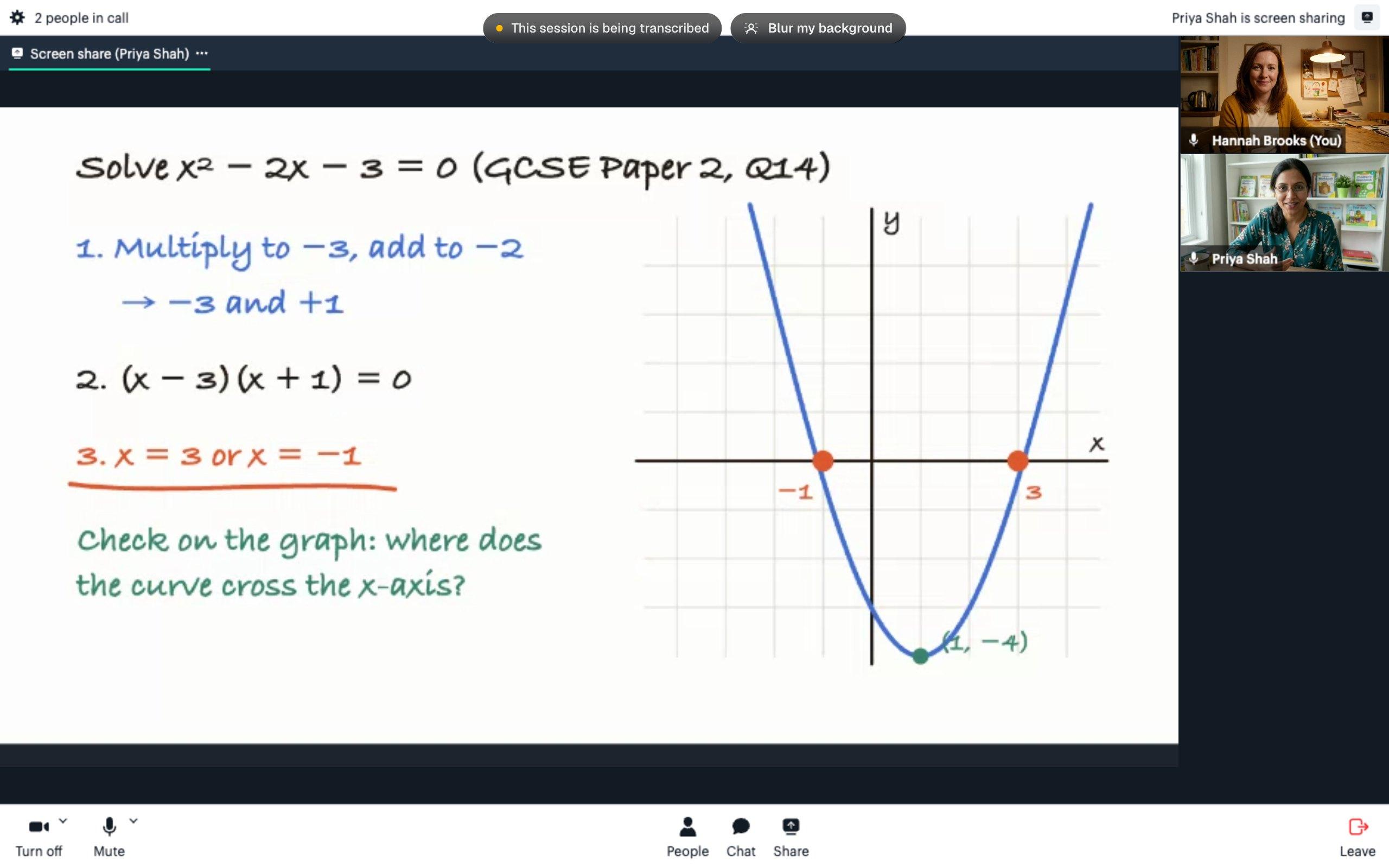
    • The call with a whiteboard shared: the quadratic x squared minus 2x minus 3 equals 0 factorised in three steps, beside its graph crossing the x-axis at minus 1 and 3

      Connect the working to the graph

      Priya can share her whiteboard and work through x² − 2x − 3 = 0 with Maya, finding two numbers that multiply to −3 and add to −2. They can factorise it one line at a time, then check the two solutions against where the curve crosses the x-axis. There's time to ask why each step works.

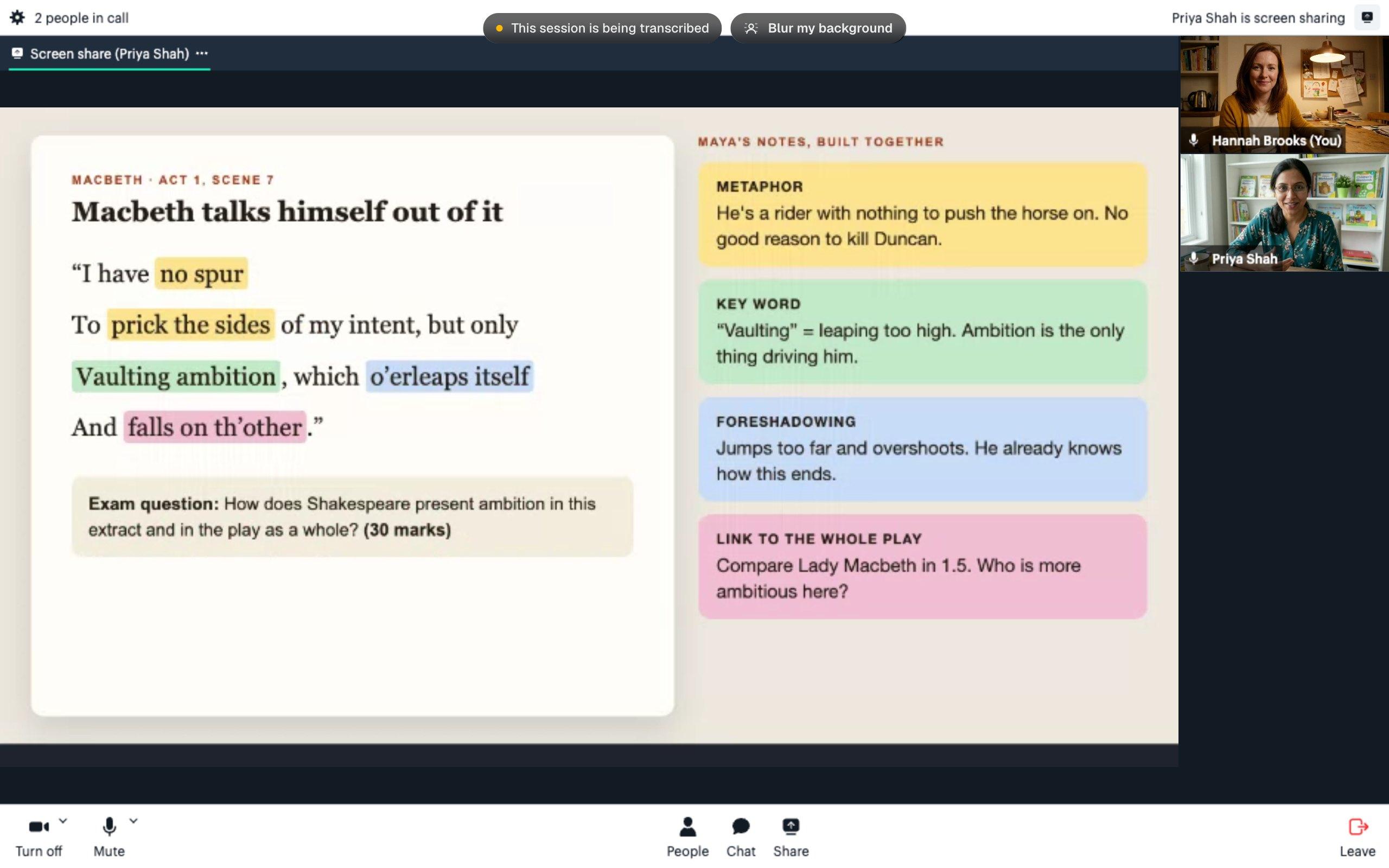
    • The call with a Macbeth extract shared: four phrases from the vaulting ambition speech highlighted in different colours, each with a matching note, above a 30-mark exam question

      Turn her Macbeth notes into an argument

      Priya can share the extract and highlight phrases as Maya talks through what she notices. Together, they can explore the metaphor, what 'vaulting' suggests and how the speech hints at what's to come. Those notes give Maya a starting point for the 30-mark question: a point about ambition, a quotation and a link to the wider play.

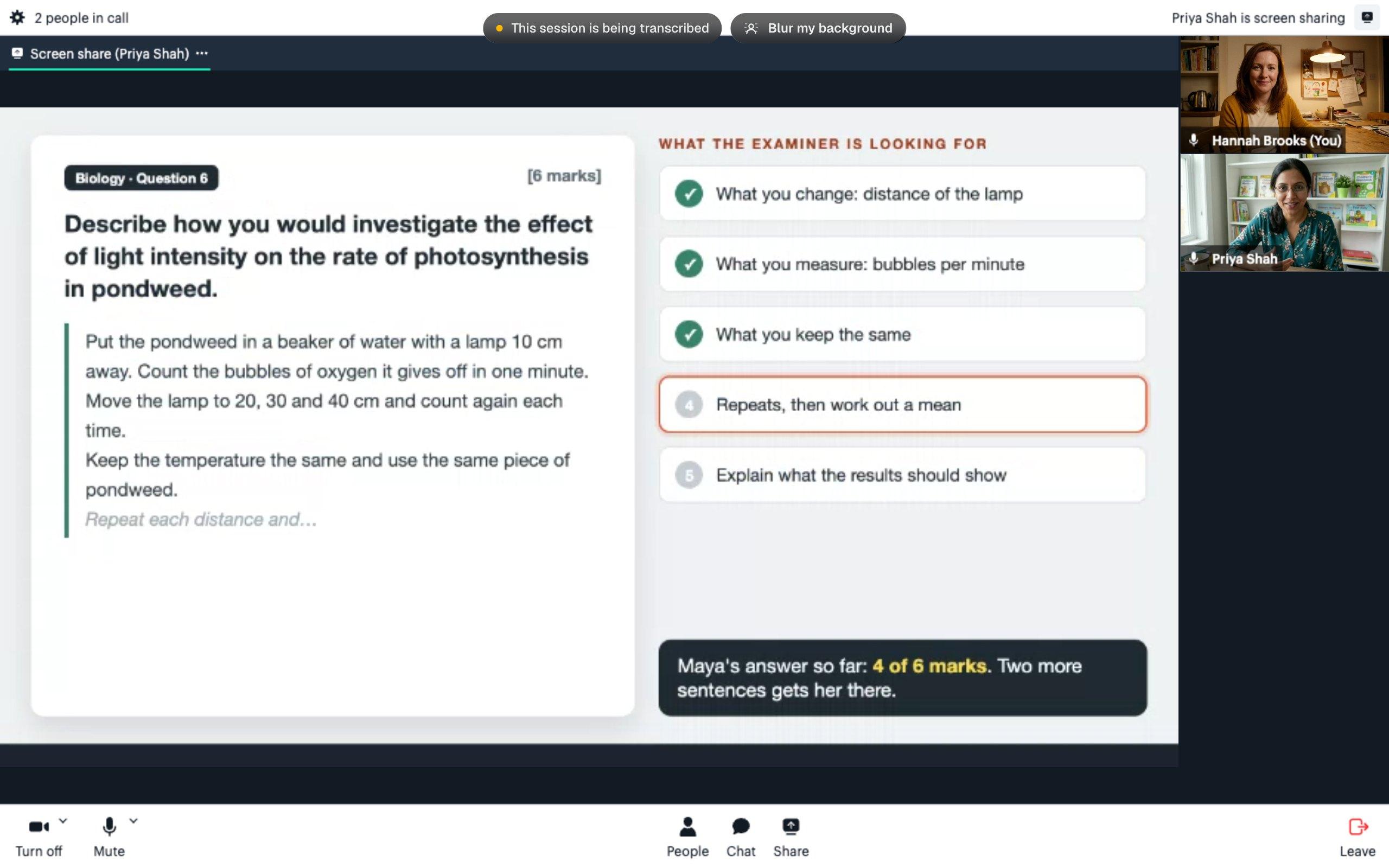
    • The call with a six-mark biology question on photosynthesis shared: a part-written answer beside a checklist of what the examiner is looking for, with four of six marks so far

      Find what's missing from a six-mark answer

      Priya can share the pondweed question beside Maya's part-written answer and a checklist of what the examiner is looking for. They can spot what she's already explained, then work on the next point: repeating the measurements and finding a mean. Maya can build on her own answer and talk through why that detail belongs in the method.

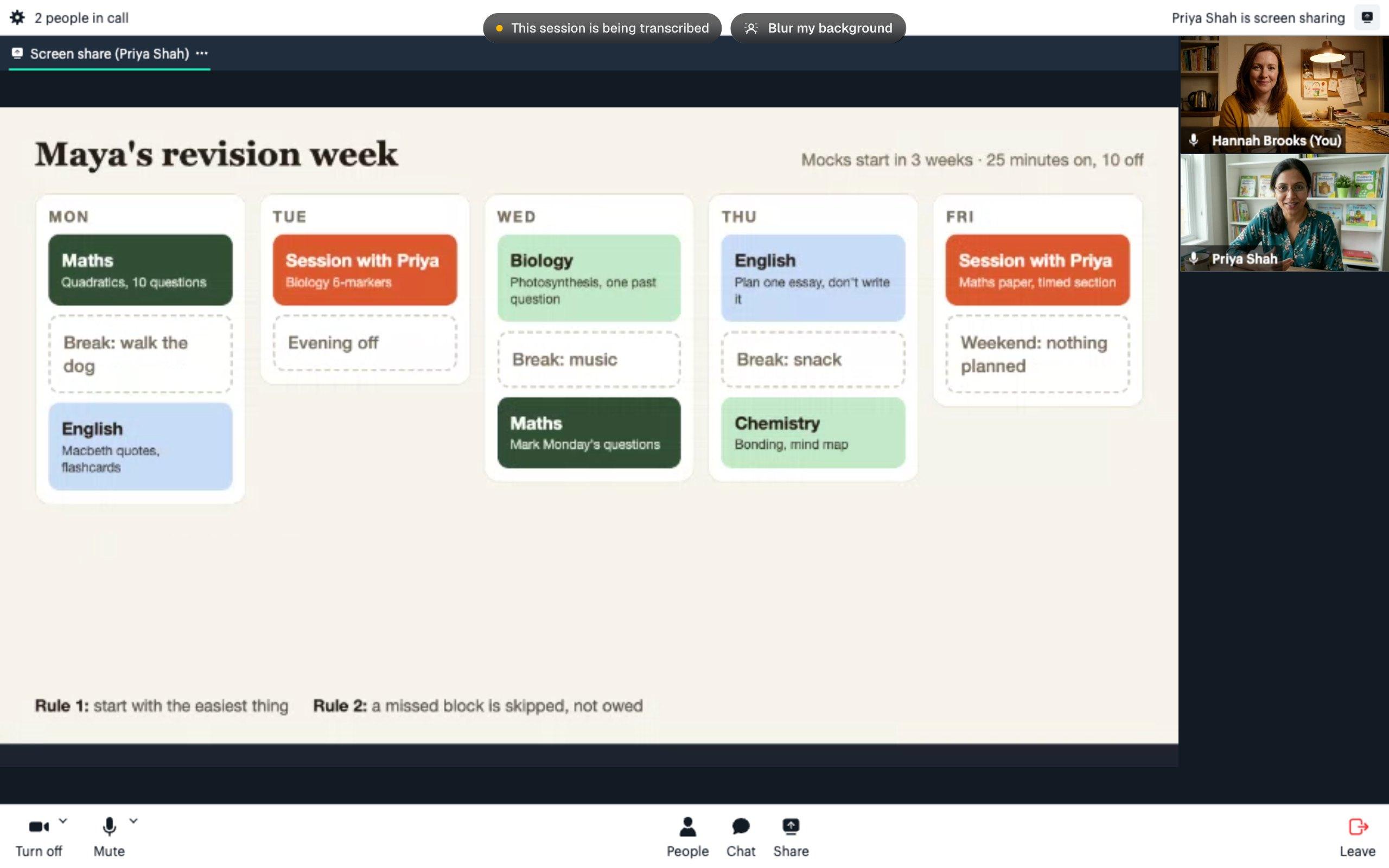
    • The call with a revision week shared: short maths, English and science blocks from Monday to Friday, breaks between them, two tutor sessions and the weekend left free

      Plan revision with room for breaks

      Priya can share a weekly plan and build it with Maya: 25-minute blocks across maths, English, biology and chemistry, with ten-minute breaks, two tutor sessions and the weekend left free. They can choose an easy first task and agree that a missed block is skipped. It doesn't become extra work she owes the next day.

  5. 05

    Keep the conversation going

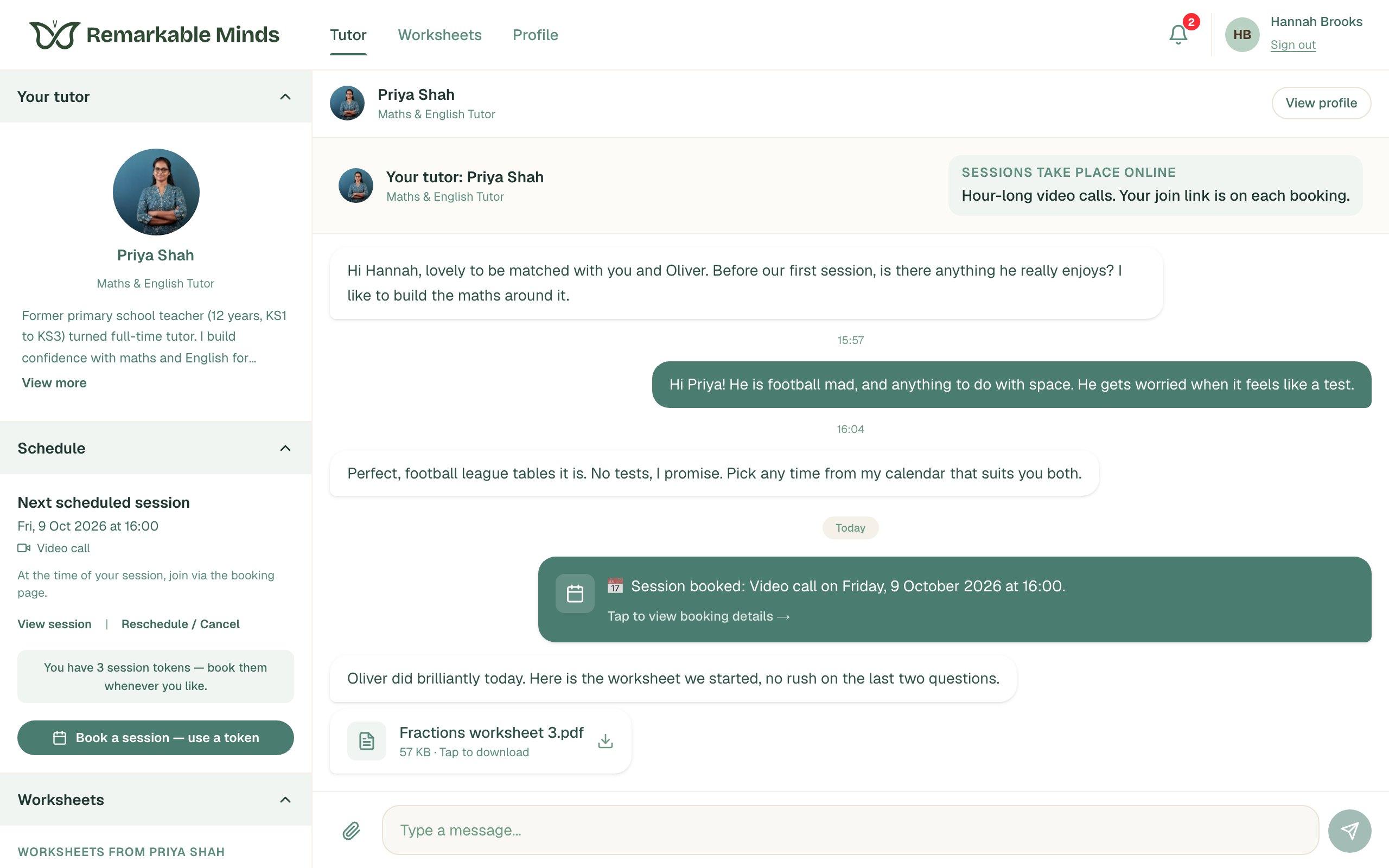
    You can message your tutor between sessions, share a piece of work your child is proud of or flag homework that's causing trouble. Your tutor can send worksheets before or after the hour, and you can change what you'd like to work on next.

    • Find your tutor's files in your messages or under Worksheets
    • Use the paperclip to send a file or a photo of finished work
    • Choose your next session from your tutor's calendar
    remarkableminds.app
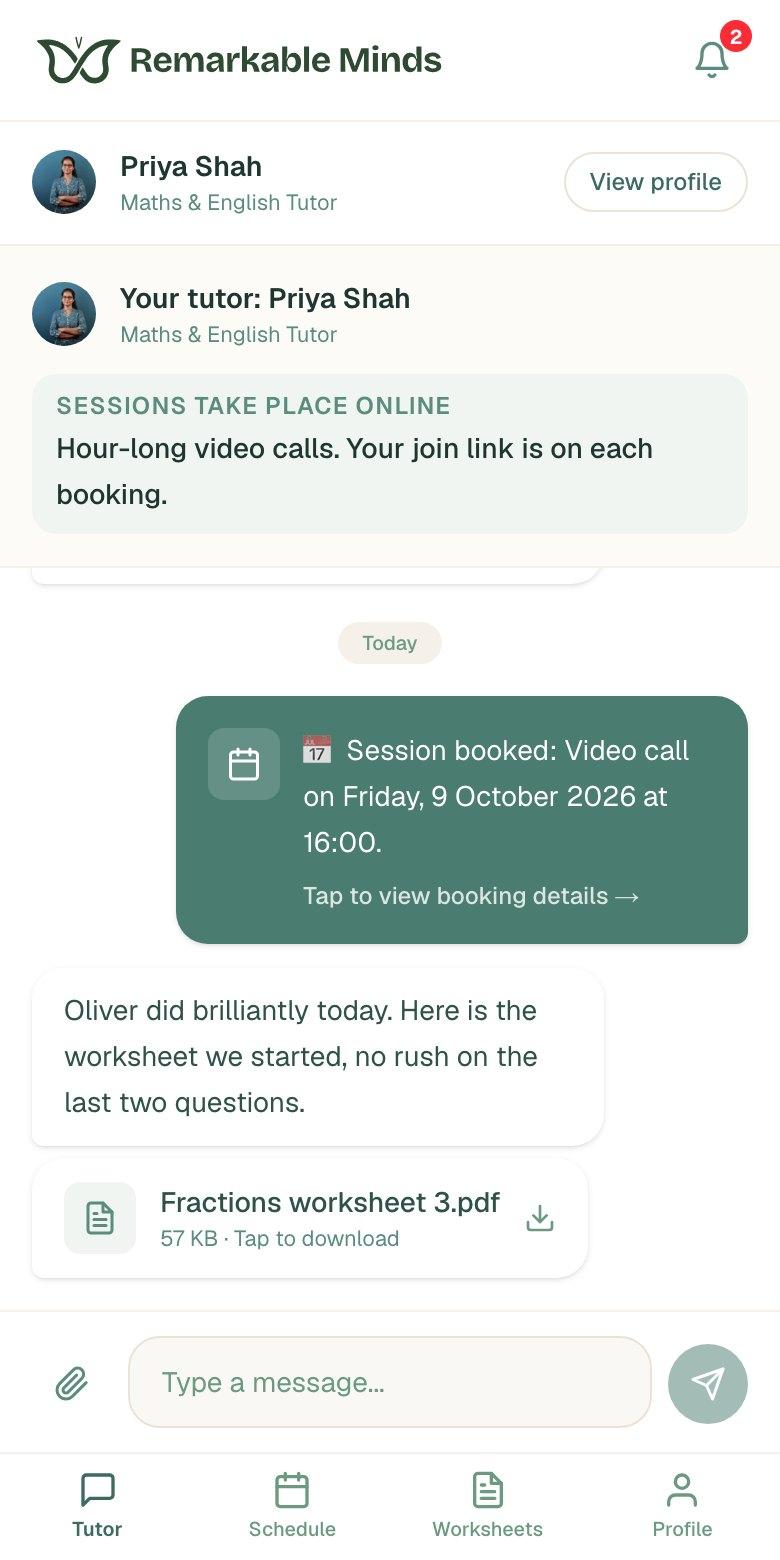
    Hannah's page showing a scheduled session and a message from Priya with Fractions worksheet 3.pdf attached

Ways to learn together

See it. Try it. Answer in your own way.

Your tutor can explain an idea visually, work through a problem with your child and give them time to respond. Screen sharing, chat and camera controls let them take part in a way that feels comfortable.

Work through it together

A book, a diagram or the homework that's been causing trouble: screen sharing puts it in front of you both. Here, Priya shares a fractions worksheet with her video still visible at the side. On a computer, your child can share their own screen so the tutor can follow their working.

How to share your screen
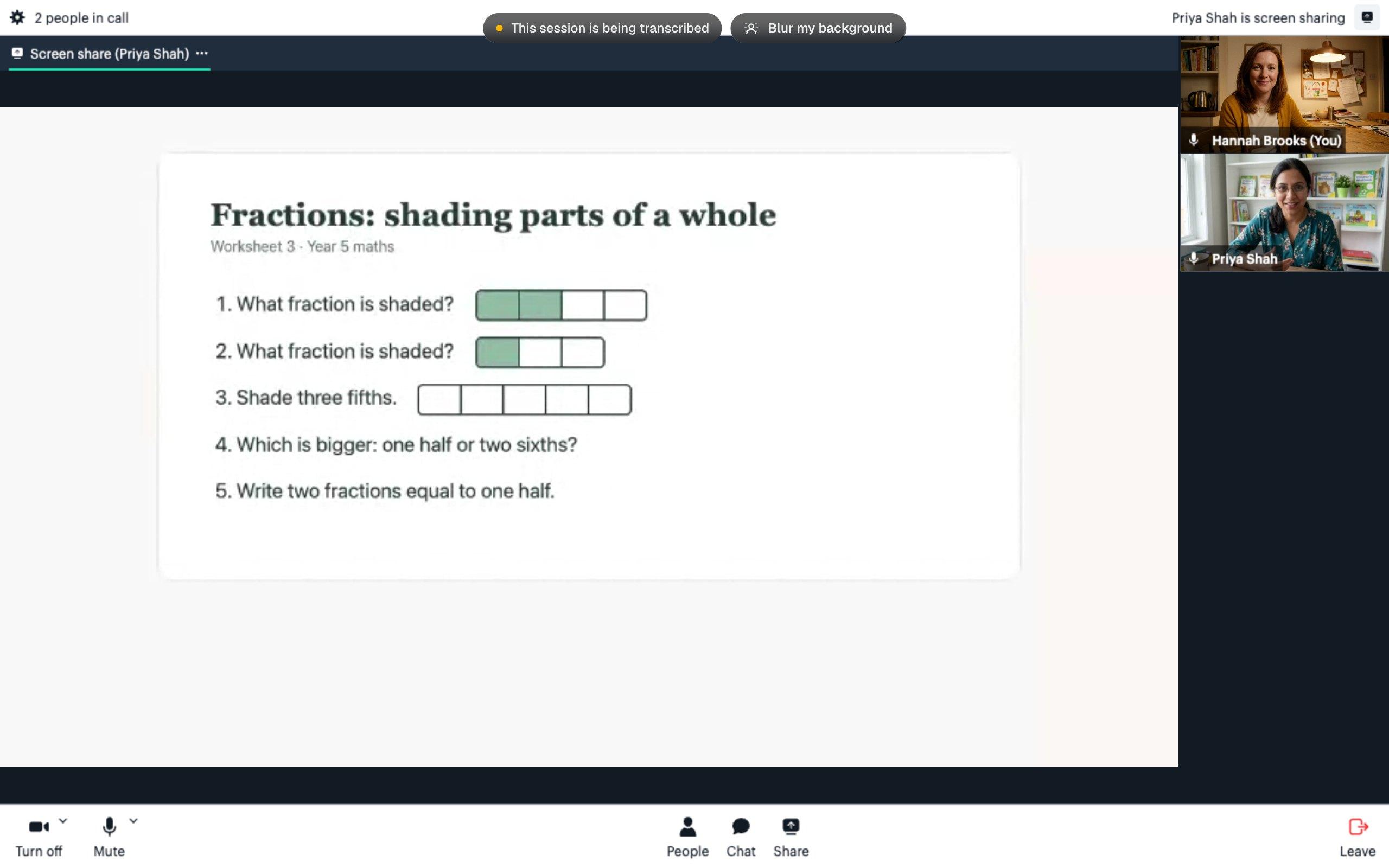
Priya's shared fractions worksheet filling the call window, with Priya and Hannah's videos down the right-hand side

A typed answer counts too

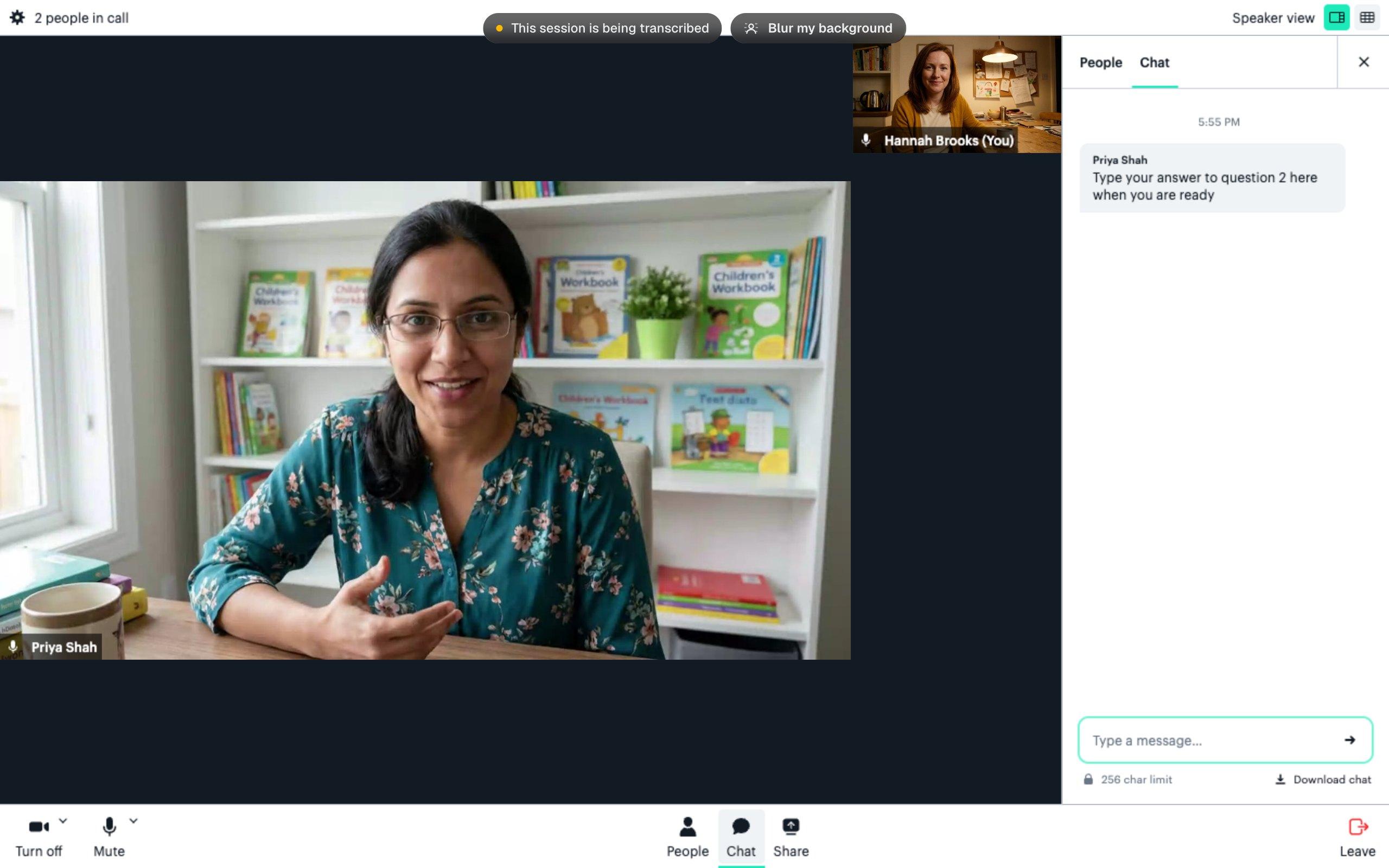
If speaking feels difficult, your child can open Chat and type instead. Here, Priya invites Oliver to answer when he's ready: another way to take part and show what he knows.

The call's Chat panel showing Priya's message: Type your answer to question 2 here when you are ready

Feel at home on the call

Your child can learn in their own space. If you prefer to keep the room out of focus, click "Blur my background" at the top of the call on a computer.

How to blur your background

Bring their learning into the hour

Send the homework they're stuck on, a school report or a photo of finished work. Your tutor can use it to plan what comes next. Resources they send back appear in your messages and under Worksheets.

How to send a file

Let your child choose how to join in

The camera can stay off and the microphone can be muted. Let your tutor know what helps your child feel comfortable, so they can focus on the learning together.

Hannah's page on a phone, showing her booking, a message from Priya and a fractions worksheet attachment

Learning from home

Their own space. A device they know.

Your child can use a laptop, tablet or phone to join the call and see what their tutor shares. A computer also lets them share their own screen, so the tutor can watch them work, and gives them the option to blur their background.

Video callView tutor's screenSend messages and filesShare your screen

Computer

Laptop or desktop

AvailableAvailableAvailableAvailable

Tablet

Can view shared screens

AvailableAvailableAvailableNot available

Mobile phone

Can view shared screens

AvailableAvailableAvailableNot available

A tutor you can feel confident choosing

Six checks before a tutor meets your child

Every check, for every tutor

We check their Enhanced DBS, match their photo ID to a live selfie, and check their right to work and qualifications. They must sign a safeguarding agreement and pass a review by our team.

Written transcription, no video or audio recording

We never record video or audio. Online sessions are transcribed in writing, and the call displays "This session is being transcribed". Anything on a shared screen is not captured.

Support starts with how your child learns

Our tutors are trained in neurodiversity and build sessions around your child. Tell them what helps, what feels hard and what you'd like to work towards. No diagnosis is needed.

Read our policies on tutor vetting and recording and transcription.

A comfortable start

Help your child feel ready

  1. 1

    Choose a comfortable spot and a device

    Your child can join from their own space on a laptop, tablet or phone. Use a computer if they'll want to share their screen.

  2. 2

    Keep the join link handy

    Find Join session in your confirmation email or the reminder sent an hour before. Add to calendar saves the date and time.

  3. 3

    Share what helps your child feel at ease

    Message your tutor about favourite subjects, worries or a task that's been difficult. Let them know if your child would prefer to type or keep their camera off.

  4. 4

    Make the first call feel familiar

    Look through these screenshots together. Show your child where they'll see their tutor and how they can use the chat to answer a question.

  5. 5

    Give yourselves a few minutes to settle

    The link works from an hour before the session. Open it early to check the camera and microphone, so you're ready when the hour begins.

Need help before the call? Message your tutor or email hello@remarkableminds.app.

Thinking about online tutoring for your child?

How can online tutoring help if my child finds it hard to focus?

The tutor can build the hour around what holds your child's attention: a game to practise numbers, a shared drawing to explain an idea or a task broken into smaller steps. They can share a visual timer and change the activity or explanation as they see how your child responds. Your child is learning one-to-one, in their own space, with a tutor trained in neurodiversity.

Can we change what the sessions focus on?

Yes. Sessions can support primary learning or GCSE maths, English and science, as well as revision planning, organisation and confidence. You can change what the hour covers as your child's needs change. Message your tutor about what's needed now, whether that's phonics practice, a tricky exam question or help getting started.

What if my child doesn't want to talk or be on camera?

They can type in the call's chat, turn their camera off or mute their microphone. Tell your tutor beforehand what feels comfortable and what your child finds difficult. Looking at the screenshots together can also help them know what to expect from the first call.

Can they practise handwriting in an online session?

Yes. Your tutor can send a worksheet beforehand, share examples on screen and guide practice while your child writes on paper at home. You can send photos of their work through your messages afterwards. Online sessions can bring together screen activities and work on paper.

Does my child need a diagnosis?

No. Our tutors work from how your child actually learns. Tell us what they enjoy, what they find difficult and what you'd like help with. A diagnosis isn't needed to get started.

Can my child use a tablet or phone?

Yes. Laptops, tablets and phones can join the call in a web browser and see everything the tutor shares on screen. Your child will need a computer to share their own screen or use Blur my background. You can also use your messages to send files from any of these devices.

When can we open the join link?

From an hour before the session starts. You'll find the Join session button in your confirmation email and the reminder we send an hour before.

Is the video call recorded?

We never record video or audio. Online sessions are transcribed in writing. The call shows the notice "This session is being transcribed". Anything on a shared screen is not captured.

What does a session cost, and how long is it?

Each session is one hour, one-to-one, and costs £80. You can also buy 4 sessions up front for £304, then book them whenever you like from your tutor's calendar.

What if our plans change?

You can reschedule or cancel from the same page you use to book. Find the session in your schedule and choose Reschedule / Cancel.

Give your child an hour built around them.

Tell us what your child enjoys, what feels difficult and where you'd like support. Online opens up the choice of tutor across the UK, so we can focus on the right match for your child. One-to-one, at home, at their pace. £80 for an hour, or 4 sessions for £304, booked whenever you like.

Already matched? Log in to book